

How to Improve Conversion Rates in Google Ads
Getting clicks is easy. Getting conversions is where the real challenge begins. Many businesses focus heavily on generating traffic through Google Ads but struggle to turn that traffic into leads or sales. High click-through rates mean nothing if users do not take action once they reach your site. In 2026, improving conversion rates is more about precision and user experience than ever before. With more advertisers using automation and AI-driven bidding, standing out now depends on how well your ads, landing pages, and offers align with user intent. This guide will show you the most effective ways to improve conversion rates in Google Ads based on current best practices and proven results.
What Conversion Rate Really Means
Conversion rate is the percentage of users who click your ad and then complete your desired action, such as filling out a form, making a purchase, or calling your business. The formula is simple:
Conversion Rate = (Conversions ÷ Clicks) × 100
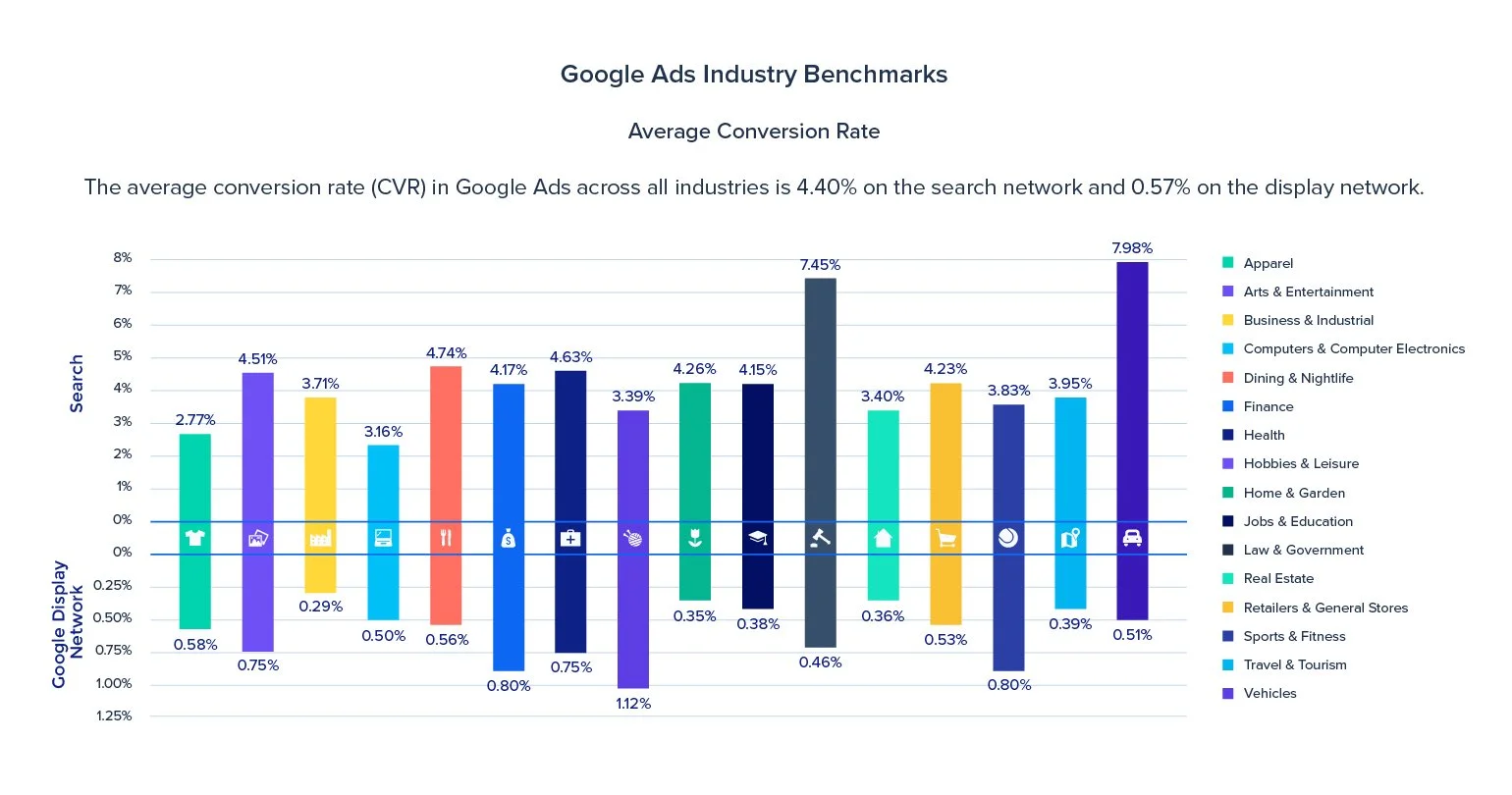
If 100 people click on your ad and 10 take action, your conversion rate is 10 percent. According to WordStream, the average conversion rate across industries in 2026 is about 7 percent. However, top-performing campaigns regularly achieve rates between 10 and 20 percent through optimization.
Why Conversion Rate Matters
Your conversion rate is one of the most important metrics in digital marketing because it determines how efficiently your ad spend turns into real business results. It measures the percentage of visitors who take a desired action—whether that’s submitting a form, making a purchase, or calling your business. A higher conversion rate means you’re getting more leads and sales from the same amount of traffic, without increasing your budget. For example, doubling your conversion rate from 5% to 10% doesn’t just improve performance—it effectively cuts your cost per acquisition in half. You’re paying the same for clicks, but getting twice the results. This is why conversion optimization is often faster and more profitable than simply spending more on ads. Increasing ad spend raises costs immediately, while improving conversion rate compounds value across every campaign, keyword, and click you’re already paying for. Even small improvements can have a significant impact. A one or two percentage point increase can mean thousands of dollars saved—or earned—over time. When conversion rate improves, everything else becomes more efficient: ad spend stretches further, ROI improves, and scaling becomes much safer and more predictable. In short, traffic gets attention—but conversions drive growth.
Step 1: Match Ad Copy to Search Intent
The most important step in improving conversions is making sure your ad copy closely matches what the user is actually searching for. Search intent is everything. When your ad aligns with intent, it feels relevant, trustworthy, and worth clicking. For example, when someone searches “Google Ads Management Company,” they’re looking for a professional agency to manage campaigns for them—not general marketing tips or a vague branding message. If your ad doesn’t clearly reflect that intent, even a click won’t lead to a conversion. Your headlines and descriptions should:
Use the keyword or a close variation directly in the ad copy
Clearly state what you offer, not just who you are
Highlight the benefits that matter most to that specific searcher (more leads, lower costs, expert management)
Set accurate expectations for what happens after the click
Consistency between the search term, the ad copy, and the landing page builds immediate trust. Users feel confident they’re in the right place, which lowers friction and increases the likelihood they’ll take action. When intent, messaging, and expectations are aligned, you don’t just get more clicks—you get higher-quality clicks that convert.
Step 2: Optimize Your Landing Pages
Even the best ad cannot perform well if the landing page fails to convert. A high-converting landing page should:
Mirror the ad message exactly
Load quickly on all devices
Include one clear call to action
Remove unnecessary distractions
For example, if your ad promises “Free Google Ads Audit,” your landing page should focus entirely on that offer and make it easy to sign up. At Cristanta Digital Marketing, landing page optimization is included in every client campaign. You can learn more about our approach on the Paid Advertising Services page.
Step 3: Simplify the Conversion Process
One of the fastest ways to lose potential customers is by making the conversion process feel complicated or time-consuming. Every extra step, field, or decision increases friction—and friction leads to abandonment. If your form asks for too much information, users hesitate. If your checkout requires multiple pages or unnecessary account creation, many will leave before completing the action. Simplicity wins. To improve conversions, look for ways to remove friction wherever possible:
Reduce form fields to only what’s essential, such as name, email, and phone number
Eliminate optional fields that don’t directly support follow-up or qualification
Use clear, single-purpose calls to action
If you sell online, enable guest checkout and minimize the number of checkout steps
Offer familiar, fast payment options to reduce hesitation
Remember, you can always collect more information later—after the lead or sale is secured. The goal of the landing page isn’t to qualify someone perfectly; it’s to get them to take the next step. The easier it is to complete the action, the fewer excuses users have to abandon the page. When you simplify the process, conversion rates almost always improve.
Step 4: Improve Page Speed
Page speed plays a critical role in both user experience and conversion performance. When a page loads slowly, visitors lose patience quickly—especially those coming from paid ads who expect instant results. Even small delays can have an outsized impact on how users behave. According to Google’s research, a one-second delay in load time can reduce conversions by up to 20%. That means you could be paying for the same number of clicks while losing a significant portion of potential leads or sales before the page even finishes loading. To improve page speed, focus on the biggest bottlenecks first:
Compress and properly size images to reduce load time without sacrificing quality
Remove unnecessary scripts, plugins, and tracking bloat that slow down the page
Minimize third-party tools that load external resources
Use fast, reliable hosting optimized for performance
Enable caching and browser compression where possible
Page speed should be tested regularly, not just once. Tools like Google PageSpeed Insights and Lighthouse can help identify specific issues and prioritize fixes. Faster pages don’t just convert better—they also improve engagement, reduce bounce rates, and support better ad performance overall. When speed improves, every click you pay for has a better chance of turning into real results.
Step 5: Use Compelling Calls to Action
Your call to action (CTA) is what turns interest into results. It must be clear, persuasive, and easy to find. Avoid generic CTAs like “Submit” or “Learn More.” Instead, use language that communicates value, such as:
Get My Free Consultation
Schedule Your Strategy Call
Start Growing My Business Today
Place CTAs in multiple spots on your page to capture attention whether users scroll or not.
Step 6: Test Ad Variations
Testing is essential to improving ad performance. Even small changes to headlines, descriptions, calls to action, or visuals can lead to meaningful improvements in click-through and conversion rates. What works today may not work tomorrow, which is why ongoing testing is critical. Instead of relying on a single message, test different angles:
One ad might emphasize cost savings or affordability
Another might highlight results, outcomes, or ROI
A third might lean on social proof, such as experience, reviews, or client success
Running structured A/B tests allows you to see which messages resonate most with your audience and which ones fall flat. Over time, this data helps you refine not just individual ads, but your entire messaging strategy across campaigns. At Cristanta Digital Marketing, we apply this principle to every campaign we manage. Continuous testing and optimization ensure ads don’t stagnate—and that performance improves steadily over time rather than plateauing.
Step 7: Use Targeted Audience Segmentation
Broad targeting often leads to wasted ad spend by showing ads to users who are unlikely to convert. Effective campaigns focus on precision, not volume. Use demographic, geographic, and behavioral data to narrow your audience to those most likely to take action. For example, a home renovation company may limit ads to homeowners within specific zip codes rather than advertising nationwide. This keeps budgets focused where real opportunity exists. Audience segmentation can include:
Location-based targeting to reach users in serviceable areas
Demographic filters such as age, household income, or homeownership (when relevant)
Remarketing lists to re-engage users who previously visited your site but didn’t convert
Remarketing is especially powerful because it targets warm audiences—people who already know your brand and have shown interest. These users often convert at a much higher rate than first-time visitors. By combining precise targeting with strong messaging, you reduce wasted spend, increase relevance, and significantly improve overall conversion performance.
Step 8: Analyze Device Performance
Your audience may behave differently on mobile, desktop, and tablet. If mobile users convert at a lower rate, test shorter landing pages, simplified forms, and mobile-specific CTAs. You can also adjust bids by device to allocate more budget to where conversions happen most often. Analyzing device data ensures you are not wasting clicks on poorly performing platforms.
Step 9: Leverage Conversion Tracking and Analytics
Without accurate data, improving conversion rates is nearly impossible. Proper conversion tracking allows you to see exactly how users interact with your ads and landing pages. Google Ads conversion tracking should be correctly set up and connected to Google Analytics 4 so all meaningful actions are captured. This includes phone calls, form submissions, purchases, downloads, and any other action tied to business value. By analyzing conversion paths, you can see where users drop off, what steps lead to successful conversions, and how different devices or traffic sources perform. This insight reveals which campaigns and keywords drive the strongest results, allowing you to optimize based on facts rather than assumptions.
Step 10: Optimize Your Keyword Strategy
Keywords play a major role in determining the quality of traffic your ads receive. Broad or vague keywords may drive volume, but they often bring in users who are not ready—or not qualified—to convert. Focusing on more specific, intent-driven keywords leads to higher conversion rates and better use of your budget. For example, a search like “hire Google Ads agency” signals strong commercial intent and is far more likely to convert than a broad term like “marketing services.” Regularly reviewing your search term report helps uncover irrelevant or low-quality queries that should be added as negative keywords. This ongoing refinement reduces wasted spend while improving overall campaign efficiency. For a deeper look at this process, our article How to Audit Your Google Ads Account for Wasted Spend walks through detailed steps for identifying and eliminating underperforming terms.
Step 11: Use Ad Extensions
Ad extensions enhance your ads by making them larger, more informative, and easier for users to engage with. Extensions such as call extensions, sitelinks, and structured snippets allow potential customers to access useful information before they even click. For instance, call extensions enable users to contact your business directly from the ad, which often converts at a higher rate than sending traffic to a website first. Other extensions can highlight services, benefits, or additional pages, helping users quickly find what they need. By improving visibility and engagement, ad extensions increase the effectiveness of your ads without increasing cost per click—making them one of the simplest ways to boost conversion performance.
Step 12: Incorporate Social Proof
Social proof plays a critical role in conversion decisions because people naturally look to others for validation before taking action. When visitors see evidence that real customers have achieved positive results, it reduces perceived risk and builds trust. Testimonials, reviews, star ratings, and short success stories help reinforce that your offer delivers on its promises.
Beyond written testimonials, credibility can be strengthened by displaying logos of well-known clients, certifications, industry affiliations, awards, or media mentions. Even subtle trust indicators—such as the number of customers served or years in business—can make a meaningful difference. The key is authenticity. Generic or exaggerated claims can have the opposite effect, while specific, relatable proof helps visitors feel confident that they’re making the right choice.
Step 13: Re-engage with Remarketing Campaigns
Most users won’t convert on their first visit, especially for higher-consideration products or services. Remarketing allows you to extend the conversation and stay visible to users who have already shown interest. Because these visitors are familiar with your brand, remarketing campaigns typically deliver higher engagement and conversion rates at a lower cost than first-time traffic. Effective remarketing goes beyond simply showing the same ad again. You can tailor messages based on user behavior—such as visiting a pricing page, abandoning a cart, or reading a specific article. Follow-up ads might include reminders, limited-time incentives, educational content, or reassurance points that address common objections. When done strategically, remarketing transforms missed opportunities into conversions and maximizes the value of your existing traffic.
Step 14: Analyze Time and Location Performance
Not all traffic behaves the same way, and assuming every click has equal value is one of the fastest ways to waste budget. User intent, availability, and readiness to take action often vary significantly based on time of day, day of week, and geographic location. Understanding these patterns allows you to allocate spend more intelligently.
By reviewing time-based performance data in Google Ads, you can identify when your ads generate the highest conversion rates and lowest cost per acquisition. For example, many service-based businesses see stronger performance during standard business hours, when users are actively looking to speak with someone or book a consultation. Ecommerce brands, on the other hand, often experience higher engagement and conversions in the evenings or on weekends, when users have more time to browse and shop.
Location data can be just as revealing. Certain cities, regions, or even zip codes may consistently outperform others due to differences in demand, competition, income levels, or proximity to your service area. An ad that performs well in one market may struggle in another, even with identical messaging.
Once these trends are identified, you can take action by adjusting ad schedules, applying bid modifiers, refining location targeting, or even creating separate campaigns for top-performing regions. This level of optimization ensures your budget is focused on the moments and places where conversions are most likely to happen—while reducing wasted impressions and spend in low-performing segments.
Step 15: Continuously Refine and Adapt
Conversion optimization is never “done.” It’s an ongoing process that evolves alongside your market, your competitors, and your audience. Search behavior changes, new competitors enter the space, and user expectations shift over time. Strategies that perform well today can gradually lose effectiveness if they aren’t revisited and improved.
The most successful advertisers treat optimization as a continuous feedback loop. They regularly review performance data, identify drop-off points or inefficiencies, test new ideas, and measure results before scaling changes. This might involve refining ad messaging, adjusting targeting parameters, improving landing page clarity, or testing new offers and calls to action.
What makes this approach powerful is compounding impact. Small, incremental improvements—when applied consistently—can lead to significant gains in conversion rate, cost efficiency, and overall ROI over time. By staying proactive and data-driven, you ensure your campaigns remain competitive, adaptable, and aligned with your long-term business goals, rather than reacting only when performance declines.
Why Work With a Professional
Improving conversion rates requires both technical skill and strategic insight. It is about aligning psychology, design, and data into one cohesive system that guides users toward action. At Cristanta Digital Marketing, we specialize in building and optimizing ad campaigns that deliver measurable growth. Our Done for You Google Ads Management includes full tracking, unlimited ad testing, and continuous optimization to maximize your conversion potential. If you are ready to see how small improvements can lead to big results, you can schedule a consultation on our Paid Advertising Services page.
Conclusion
Improving conversion rates in Google Ads is not about luck or guesswork. It is about understanding what your audience wants, removing friction, and consistently refining your approach. From aligning ad copy with search intent to optimizing landing pages and tracking performance, each improvement brings you closer to achieving more with less. When your campaigns are properly managed, conversion rate optimization becomes a predictable system for growth — not just a marketing experiment. If you want to transform your Google Ads performance in 2026, partner with a team that understands how to turn clicks into conversions that drive real business results.